EVENT TYPES
THREE TYPES OF EVENTS
The Simple Gesture Web App currently offers 3 major event types. Each one has powerful features that make it convenient for donors to participate.
- DONOR/DRIVER EVENTS: These pool a large quantity of donors and drivers together. The system then builds "least mile routes" that optimize routes for each driver.
- NEIGHBORHOOD EVENTS: These are small groups of donors with a dedicated "Neighborhood Coordinator" that handles everything.
- COMMUNITY CIRCLES: This event is for a group of donors to bring their donation to a central location, like a school, church, clubhouse or business.
DONOR/DRIVER EVENT
Best when starting a chapter
Often times, this is the easiest way to start. Your donors will likely come from all over your territory as you set up donor drives at music festivals, farmers markets, and social media.
As donors register they are asked to drive. On average about 1 in 6 will say "yes".
When you schedule your first "Donor/Driver" event, all of these Registered Users will be sent to our Route Optimization system. The system will determine the best routes for the donors and drivers based on a variety of criteria, such as;
- Driver Start Location (where they get their bags and information cards)
- Driver End Location (Food Bank or pantry)
- # of drivers selected, in comparison to # of total donors (we call this the "Driver Ratio"
One way to think about this type of event is that the donors are going to have a different driver nearly every time. The selection is based on optimization.
The advantage to this model is it's the most flexible when it comes to registering donors. Start this way and build up your donor base!
When you create "Campaigns", you will have "register" button at the top. Any person that is covered by your zip codes will then be added to that Donor/Driver event.
Click here to learn more about setting up a Donor/Driver event.
The disadvantage of this model is there is no true connection between the driver and the donors. This connection has been proven to become a big deal! There are many programs across the country that only have dedicated drivers for a group of donors. This is why we offer a "Neighborhood Event".
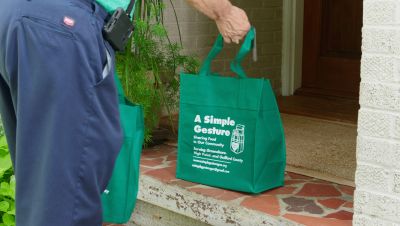
NEIGHBORHOOD EVENT
Best for established Chapters
Over time your chapter will grow. As this happens you will begin to see more pins in concentrated areas on your map. This is when you should consider adding a Neighborhood Event.
A Neighborhood is what it sounds like; it's a group of donors that live near each other. A Neighborhood Coordinator (NC) is a registered user that volunteers to oversee this neighborhood.
Often times you might just want to start a neighborhood with one person! The Neighborhood Coordinator may be the only member of a neighborhood. This is great! The reason, they want to grow their donor base! Every NC will become an ambassador to your program.
This model is preferred because it will add donors faster and be more sustainable. A Neighborhood will end up with certain neighbors that backfill for the NC when they are vacation. Neighbors will get other neighbors involved. It's a true community spirit that will come alive.
The disadvantage of this model is that it's not so easy getting someone to be a 'Neighborhood Coordinator' (NC). It may seem like too much work at first, but once they dig in they will find its fun and fulfilling.
A Neighborhood event happens along with a Donor/Driver event. In the Neighborhood set up, you will select the "Donor/Driver Primary Event" to make the connection.
Click here to learn how to set up this type of event.
Click here to learn more about what a Neighborhood Coordinator does and a bit more information about how Neighborhood events work.
COMMUNITY CIRCLE EVENT
Best when Donors belong to a Group
A "Community Circle" is any time a group of donors share something in common.
- School or Church
- Social or Professional Club
- Home Owners Association
- Apartment Complex
- Neighborhood
- Business
As people share something in common, they can also organize themselves into a Food Drive.
A Community Event should be set up to recur on a predictable schedule. Perhaps the "first Friday" of every month, every other month, or every quarter. Or they may coincide with a clubs meeting date, church service or other schedule that brings people together.
One way to run a Community Event is for everyone to bring the food donation with them. When you set it up the donors get a notification "bring your food donation to room 202 between July 11th and July 12th".
Another way to run a Community Event is to ask the donors to leave their bag in front of their house. "I'll be by to pick up your donation on July 12th between 9am and noon".
When you set up a "Community Event" you will assign it a Campaign Code. Campaigns are created by the Chapter Administrator. Think of it as a unique web page. For example a Campaign can be set up for the Unity Church. Each Campaign gets a QR code and URL (unique web address). When someone scans that code or goes to that web page they will see "Unity Church" at the top, with a "REGISTER" button. They simply click that register button and they are assigned that Campaign Code.
You can also take any donor in your system and later give them that Campaign Code. This is a great option when it comes time to switch a donor for "Donor/Driver Event" to a Community event. You go to their User Page and select a new Campaign Code.
For example; let's way we set up UNITY CHURCH as a Campaign. We then send an email to all church members with that URL. They click it and join A Simple Gesture with that Campaign Code assigned to to them. But then you find out that John Smith is in your church and already was in a "Donor/Driver" event. You open his USER account and select Unity Church in the Campaign dropdown and John is now in your event.
Soon we will have a tool to draw a "loop" around a group of donor pins to assign them all to a Community Circle. This allows you to quickly move donors that live in a near-by area to a "Community Coordinator".
To add this type of event, click "ADD EVENT" and select "COMMUNITY" as Event Type.
