
Neighborhoods
A "Neighborhood" is a group of food donors that are connected. They will have a "Neighborhood Coordinator" that takes care of the group.
This connection is what community is all about. We've found that once a Neighborhood is established, it thrives in SimpleGesture.org.
HOW IT WORKS
It's the easiest way to bring friends and neighbors together to fight Food Insecurity. It's a grass
Step 1: The Neighborhood Coordinator provides their neighbors (or any group) a QR code or a web-link to register. As people register they join that neighborhood. They are either given a reusable green bag up front, or they use any bag or box for their first donation.
Step 2: A few days before the next food pick-up those folks get an email or text asking if they will have a bag of food out front. They simply reply yes or no.
Step 3: The people that wish to donate this time around fill a bag with foods from the "Needs List". To see the list for your neighborhood log onto your "My Site Page". Click here for log in help, you don't even need a username and password!
Step 4: The Neighborhood Coordinator (or someone they designate) comes by to pick up the food. They take to a nearby Food Bank or Pantry. And they leave behind a nice reusable bag. The card on the bag has a needs list and the next event date.

Be a Neighborhood Coordinator!
It doesn't take a lot of time and you will feel great while doing it!
A Neighborhood Coordinator may sound like a lot of work, it really isn't. It just becomes something you do when it's convenient. The system we provide does most of the work.
YOUR ROLE:
- Let us know you want to be a coordinator, we will call you and work out the area you want to cover.
- We give you a stack of cards that have a QR code and instructions for your neighbors. They scan the code to join your neighborhood. Or, you can send them an email with a link we provide you, they click that link to join your neighborhood.
- We help you sequence your stops. It's very easy, you have a list of donors and pins on a map, and you just click them to set up the order. And you only need to do this once. As more neighbors join, you just drag and drop them into the sequence you prefer.
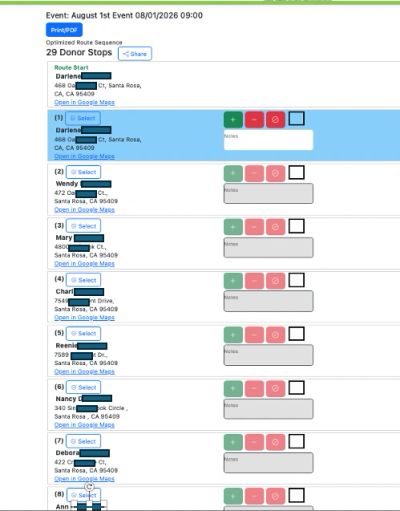
- A couple days before the event date you get a text and email saying "your route is ready", you click the link and it shows you the addresses. There is a simple +- button to put in the # of bags.
- Your last stop on the route is the Food Bank or Pantry nearby. We will help you pick a convenient drop off location.
OUR ROLE:
- We are here to guide you step by step.
- We will print up your "Join our Neighborhood" cards and provide you with all the bags you need.
- Our system will remind your neighbors about the upcoming pick-up date. They simply reply "Yes" or "No" to our email or text.
- For those that reply yes, our system organizes them into a route. It's a 'real time' system, so if someone decides not to have a bag out front it will show on your phone. You won't waste time going to homes that don't have a bag!
- We send out a "Thank You" and a "Sorry We Missed You" right after the event. These updates also include the results from your neighborhood and the overall event, as well as their personal donation history. Everyone can see the impact!
Sequencing a Route
HOW TO SEQUENCE:
Sequencing is done to arrange the pins in your neighborhood into a pattern that is convenient for you. When the Chapter Admin "creates routes" the system will determine which donors have agreed to participate this time, and put them into a "Route" that shows up in your 'My Site Page'.
Here are some highlights;
- Log into your 'My Site Page' and select "Neighborhood" from your menu.
There are two methods;
- clicking pins from start to finish in the order you wish
- Drag and Drop: dragging a name from the list on the left to the right position.
We suggest to use the pin method for the 1st time, then as new donors register use the drag and drop. If you use the pin mode it removes all the sequence #'s, you are starting over each time.
PIN METHOD: After you have selected "Sequence" select "Pin Method" on the "Start Sequence Mode" box that appears. On the left you'll see all the donors highlighted in red (see photo gallery). It will ask you to click the first pin, this assigns that pin #1. Continue until done. As you go, you'll see the #'s appear. If you make a mistake on one pin, keep going! its easy to fix with the "Drag and Drop" method.
You'll see the names highlighted in Red on the left go into a sequence, with the PIN number. Be sure to click SAVE!!
DRAG and DROP: This is best if the list has already been sequenced and you just have a few new donors.
Step 1: After you have selected "Sequence", you'll see in the "Start Sequence Mode" option #2, which is to just drag and drop. Go to the list on the left to do this.
Step 2: Drag any name in red, or any other name, up or down. This is done by clicking on them with the left mouse button, then drag to the position they need to be and release the mouse button. If they don't respond, try refreshing your web page (the refresh button is part of your browser, if you don't know how to do it you'll need to do a google search "how to refresh a web page on Safari (or chrome, edge, etc)".
Be sure to click "Save" when done. Or if you want to start over, click "Cancel".
